SIMPLE Camera Manager
One panel. Every camera. Full control. Centralize your camera settings, batch rendering, and quick switching — all from the 3D View.
One Panel,
|
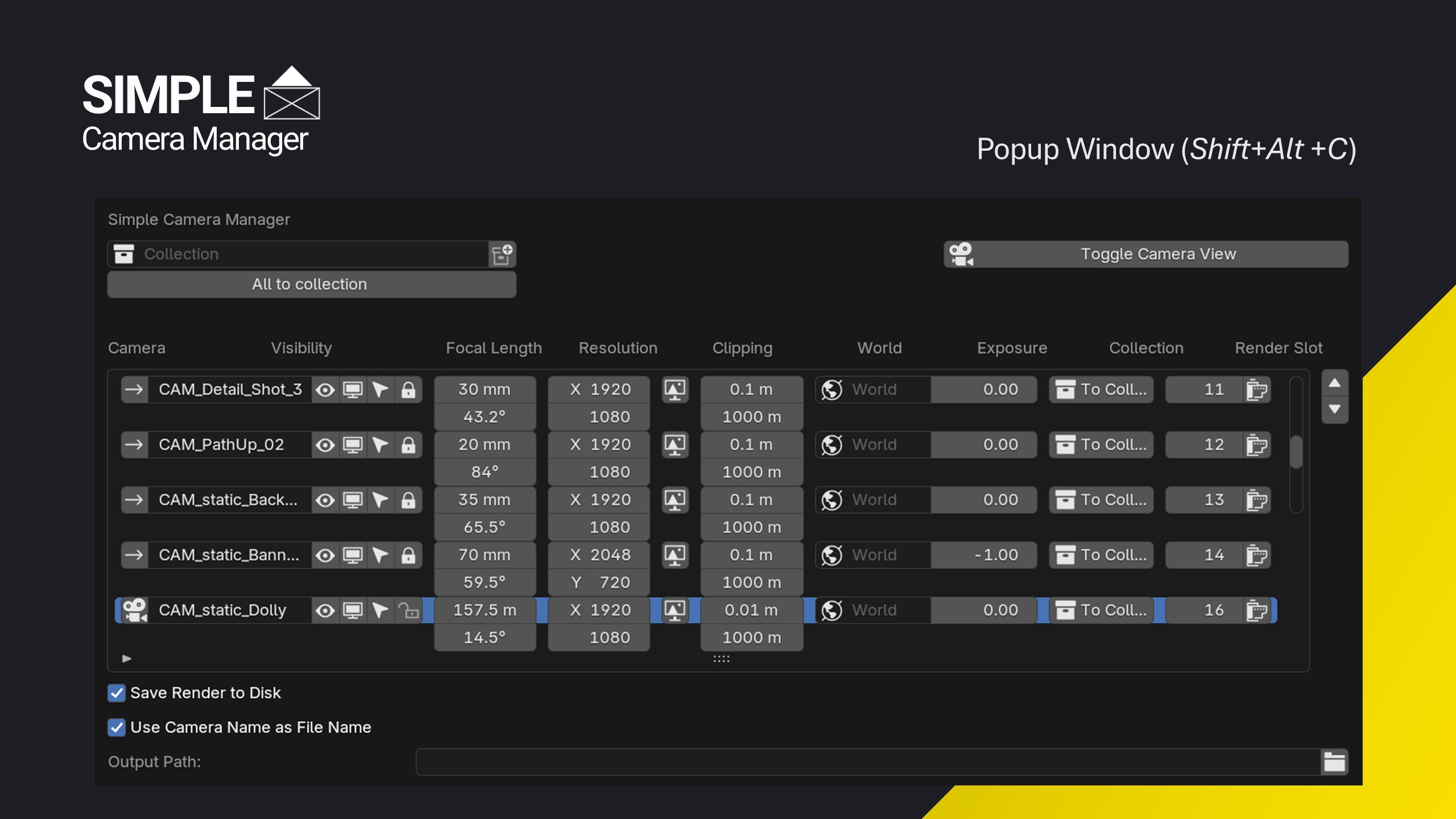
| ✓ Adjust every setting in a spreadsheet-style panel |
| ✓ All settings at one glance |
Render Every Camera,
|

| ✓ Only batch renderer I'm aware of that shows the render update live |
| ✓ Doesn't rely on misusing stereoscopic settings or camera markers |
| ✓ Each camera keeps its own resolution, exposure, and settings |
| ✓ Uses the current scene frame for every camera in the batch |
Every Camera,
|

Never Overwrite
|

Find the Perfect
|

| ✓ Reference Plane Gizmo defines what should always stay in focus |
| ✓ Modal hotkeys adjust the dolly zoom by distance or by focal length |

Model From
|


Know a Camera's State,
|
| ✓ Blue frame — camera transform is locked |
| ✓ Red frame — camera is tied to the current viewport view |
| ✓ Both colors fully customizable in preferences |
Everything Inside
One panel, the whole camera workflow.
|
Quick Camera Switching
Jump straight to any camera without leaving the viewport.
Alt+Shift+C Camera Manager
Alt+C Camera Pie
Ctrl+Shift+←/→ Prev / Next Camera
|
Focal Length & Resolution Presets
Apply common values instantly from preset selectors in the pie menu and N-Panel.
|
Composition Guides
Overlay rule-of-thirds and other framing guides in the viewport, with the area outside the frame darkened.
|
|
Camera Management
Lock/unlock all camera transforms and organize cameras into collections in one step.
|
Visual Settings
Assign a different world material per camera and adjust exposure to compensate for lighting.
|
Customizable Hotkeys
Personalize every shortcut in preferences. Works on Windows, macOS, and Linux.
|
Who It's For
Artists and studios who build their pipeline around it.
|
Freelancers & Small Studios
Set up multiple cameras, adjust their settings, and batch render to show every angle fast for client review.
|
Marketing & Product Renderers
Unique resolutions per camera for headers, thumbnails, and social content — all rendered in one batch.
|
|
Archviz Artists
Dedicated render slots per view build a complete interior and exterior portfolio.
|
Modelers Working From Reference
Match a real-world lens with the dolly zoom before you model a single vertex.
|
What Users Say
|
"Great addon, does everything I need without too much fluff."  Patrik Pulkkinen, Concept Artist at Remedy Entertainment
|
|
"This is the best addon for managing cameras I have found. Well worth the price! 5 stars." — Ken Kellett |
Why Trust Simple Camera Manager?
Over a decade refining workflows for real-time engines. Simple Renaming, Simple Collider, Simple Export, and Simple Camera Manager are used and trusted by thousands of artists and studios worldwide.
| Simple Renaming — 50,000+ users | Simple Collider — 500+ users | Simple Export |
| Buy on Superhive | Documentation | More by Matthias | ArtStation |